
GoHighLevel menu customization for a calmer workday
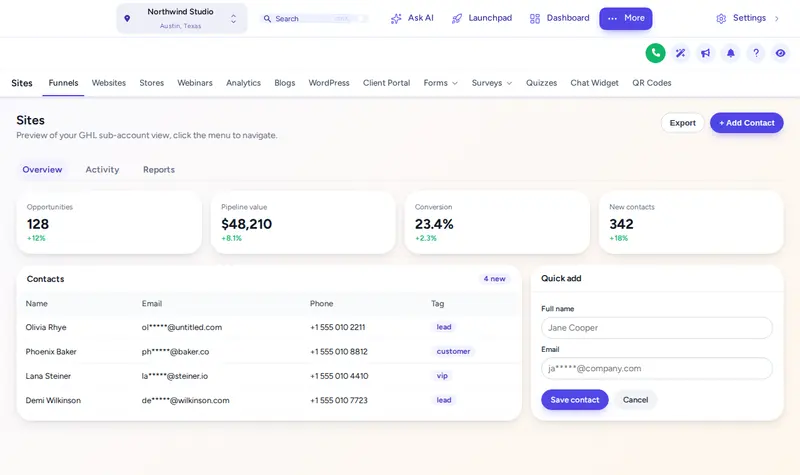
GoHighLevel menu customization lets you put the four places your team opens all day at the top, tuck the rest away, and choose a sidebar, top bar or mega menu layout. A floating quick menu then keeps those places one tap away on every page.
Styles you can switch between
8 top bar styles
8 mega menu styles
8 header styles
A shortcut bubble that follows your team around
Open the bubble, hover the dock or rail, drag it out of the way. 3 layouts and 8 designs.
Hiding a menu item tidies it away; it does not lock it. Access is still controlled by GoHighLevel’s own user permissions, and the agency view and sub-accounts each keep their own menu.
- Announcements (Vitality and up) put holiday hours or a new booking link in front of the team.
- Your own links: help docs, an intake form, a course portal.
- New GoHighLevel pages are added to the menu automatically unless you turn that off.
Set it up in three moves
Arrange the menu
Drag items into the order your team uses, rename them, choose icons, hide what nobody needs and add your own links.
Pick a layout
Sidebar, right dock or top bar in 8 styles, a sub-menu style (list or 8 mega styles) and one of 8 header styles.
Add the quick menu and save
Switch on the floating quick menu in one of 3 layouts, then save. Agency and sub-account views update on their next page load.
Menu and navigation questions
Left sidebar, right sidebar, a top bar (8 styles), a top bar merged into the header, or collapsed icons. Sub-menus can be a plain list or one of 8 mega menu styles.
A small launcher that floats over every page and opens your most-used places in one tap. It comes in 3 layouts (bubble with a grid, dock bar, side rail) and 8 designs, and staff can drag it out of the way.
Yes. Drag items into order, rename them, pick icons and hide what a team does not need, so a receptionist sees calendars, conversations and contacts first. The agency view and sub-accounts each keep their own menu.
No. Menu changes are visual. User permissions are still set in GoHighLevel, so a hidden item is tidied away rather than locked.
Mega menus and the floating quick menu are part of Vitality ($457) and Total Wellness ($887). Balance includes the sidebar or top-bar layout choice with each theme.
Yes. The top bar wraps and collapses into a menu button on narrow screens. Use the phone toggle in the preview to see it.
Yes, announcements are part of Vitality and above: a short message for your team or clients, such as holiday hours or a new booking link.
Rarely. The items are the same GoHighLevel pages in a clearer order. Most teams notice the calmer layout rather than a new system.
Explore the rest of the studio
Health and Wellness GHL Snapshot is independent and is not affiliated with, endorsed by or sponsored by HighLevel. GoHighLevel and HighLevel are trademarks of their owner. The customizer adds your own CSS and JavaScript on top of GoHighLevel through its Custom JS and CSS settings; it does not change HighLevel’s software. We are not a healthcare provider, and nothing here is medical advice.
Fewer clicks, calmer days
Menus, the quick menu, dashboards, pipeline boards and contact actions all come with Vitality for one payment of $457.
Packages from $207, paid once. Login emailed within minutes (max 24 hours).