GHL contact action buttons for one-tap follow-ups
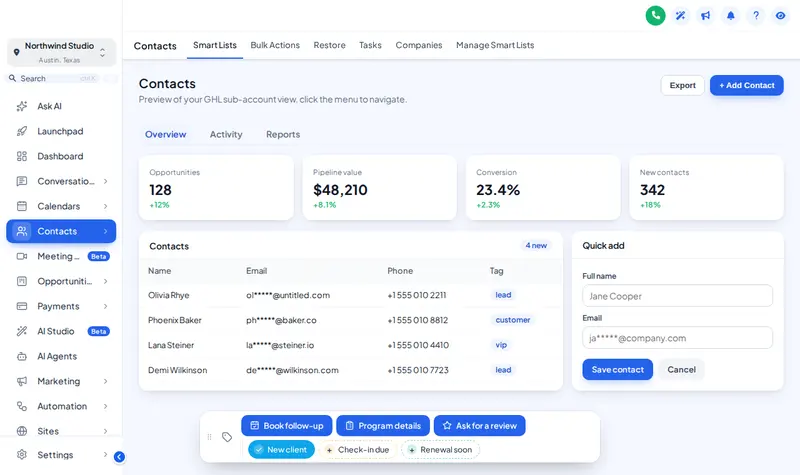
GHL contact action buttons add a small bar to every client record: quick tag chips, buttons that start workflows through tags, and short forms that save custom fields. The jobs your front desk repeats all day become a single tap.
Client record · Jordan Lee
Tag “book follow-up” added, so your follow-up workflow can start
The real contact actions bar, on a sample client
Loading the live preview
A colour per tag. This is the real contact actions bar. Tap a quick tag, open Program details to see its form, or drag the bar by its grip. Nothing is saved in the preview; inside GoHighLevel the contact updates at once.
Four buttons wellness teams set up first
Book follow-up
Adds the tag “book follow-up”; your reminder workflow sends the booking link.
Program details
A three-field form: program, start date, sessions left. Saved into custom fields.
Ask for a review
Adds a tag that starts your review request. Tap again to remove it.
Check-in due
A quick tag chip that turns green when the client is flagged for a check-in.
The bar changes contacts through GoHighLevel’s own API with the signed-in user’s session, the same calls the interface makes. A user can only do what their GoHighLevel permissions already allow, and the page updates without a reload.
- 6 starting positions, draggable by its grip.
- Form fields: text, paragraph, number, date, drop-down, email, phone or link.
- Optional notes on the contact recording which tag or field changed, and by whom.
- Show a chip or button in every sub-account, or only the ones you list.
Live in three steps
Add chips and buttons
In the Contact actions tab, add the quick tags and buttons your team uses most, with colours, icons and confirmation messages.
Connect your workflows
Point each button at the tag a GoHighLevel workflow listens for, or at the custom fields a short form should fill in.
Save
The bar appears on every contact record, in the sub-accounts you choose, on the next page load.
Contact actions questions
What does the contact actions bar do?
It adds a small bar to every contact record with quick tag chips, buttons and short forms. One tap adds a tag (which can start a workflow) or saves custom fields, without scrolling through the record.
Can a button start a GoHighLevel workflow?
Yes, through tags. A button adds a tag such as “book follow-up”, and a workflow that starts on that tag does the rest. The snapshot’s appointment workflows are a natural fit.
What can the mini forms update?
Custom fields on the contact: text, numbers, dates and drop-downs. For a wellness practice that might be program name, start date and sessions left.
Where does the bar sit on screen?
In one of 6 positions (bottom or top, left, centre or right), and staff can drag it by its grip if it covers something.
Does anything happen in the preview?
No. The preview shows the real bar, but nothing is saved or sent. Inside GoHighLevel the contact updates straight away.
Which package includes contact actions?
Vitality ($457) and Total Wellness ($887).
Can I colour-code the tags?
Yes. Give each chip its own colour, use your brand colour for all of them, or show green when a tag is on and grey when it is off.
Is it safe to let front-desk staff use it?
The bar only does what you configure: add or remove the tags you choose and update the fields you list. GoHighLevel permissions still apply to each user.
Explore the rest of the studio
Health and Wellness GHL Snapshot is independent and is not affiliated with, endorsed by or sponsored by HighLevel. GoHighLevel and HighLevel are trademarks of their owner. The customizer adds your own CSS and JavaScript on top of GoHighLevel through its Custom JS and CSS settings; it does not change HighLevel’s software. We are not a healthcare provider, and nothing here is medical advice.
One tap, workflow started
The contact actions bar is part of Vitality ($457 once) with menus, dashboards and pipeline boards.
Packages from $207, paid once. Login emailed within minutes (max 24 hours).