
It is 9:12 on a Saturday morning and your 9:30 glutathione client just texted: “So sorry, something came up, can we reschedule?” You are already gowned up and your nurse is prepping the room. In twenty minutes a drip chair that was supposed to earn you a couple hundred dollars is going to sit empty, and there is nothing you can do about it, because by the time you think of someone who might want the slot, the slot is gone.
That empty chair is the quiet leak in almost every IV, injectable, and weight-loss clinic I build systems for. You cannot stop clients from cancelling. What you can do is make sure the slot they just freed up gets offered to the next person who wants it, automatically, in the three or four minutes while the client who cancelled is still typing an apology. This post is the full waitlist system that does exactly that: six stages, built for the RN or NP who owns the clinic and runs it without a marketing team. You get the real text copy to lift, the timing that works, and the way each stage breaks so you can skip the mistakes I have watched other owners make.
Table of contents
- What a last-minute cancellation actually costs you
- The six-stage automated waitlist system
- Stage 1: Build the waitlist at the moment of booking
- Stage 2: Detect the open slot the instant it frees up
- Stage 3: Blast a first-come offer to the right clients
- Stage 4: Auto-book the first to claim it
- Stage 5: Handle the overflow, declines, and partial fills
- Stage 6: Measure your fill rate and tune
- Run it for your size: solo, three-location, med-spa
- The compliance lines to respect in 2026
- Objections owners raise
- Frequently asked questions
What a last-minute cancellation actually costs you
A same-day cancellation is not a delay, it is a sale you will never make, because the hour it freed up cannot be sold twice. Your rent, your nurse’s wage, and your own time are fixed for that hour whether a client is in the chair or not. When the chair sits empty, every one of those costs still runs, and the revenue that was supposed to cover them walks out the door with the client who cancelled.
Put a real number on it. Medical spas saw cancellation rates around 14% in 2025, down from 16% the year before, with no-shows holding near 4% (Zenoti 2026 Benchmark). The median medical-spa ticket is about $216 per visit (Zenoti’s no-show revenue calculator). Run a modest solo clinic at eight booked slots a day, six days a week, and a 14% cancellation rate means roughly one slot a day disappears. If nothing refills it, that is about $216 a day, near $1,300 a week, and north of $65,000 a year in revenue that was booked and then quietly lost.
The trend underneath those numbers is worse than the headline. Zenoti found that 37% of patients who book their second appointment cancel before it happens, and that once a patient actually completes that second visit, the cancellation rate drops to 4% (Zenoti). So the cancellations hitting you hardest are the early ones, from newer clients you have not yet turned into regulars. Every one of those you let evaporate is both a lost $216 and a lost shot at a long-term client.
Share of booked appointments cancelled, by where the client is in their journey (%). The early cancellations are the ones a waitlist recovers. Source: Zenoti 2026 Medspa Benchmark, via Zenoti.
The market is not shrinking, which is exactly why this stings. The medical-aesthetics industry has eclipsed $17 billion, with the average med spa pulling $1,398,833 in annual revenue (American Med Spa Association), and the IV hydration market sits near $3.0 billion in 2026 (Grand View Research). Demand is there. The leak is not demand, it is the gap between a chair opening up and someone ready to fill it ever hearing about it.
The six-stage automated waitlist system
A waitlist system is a fixed sequence that captures clients who want an earlier or sooner slot, then automatically offers a freed-up slot to them the instant one opens. It is not a sticky note on the front desk and it is not your nurse scrolling her phone for someone to call. It is a handful of connected steps that run on their own, so the slot a client cancelled at 9:12 is offered, claimed, and rebooked before 9:20.
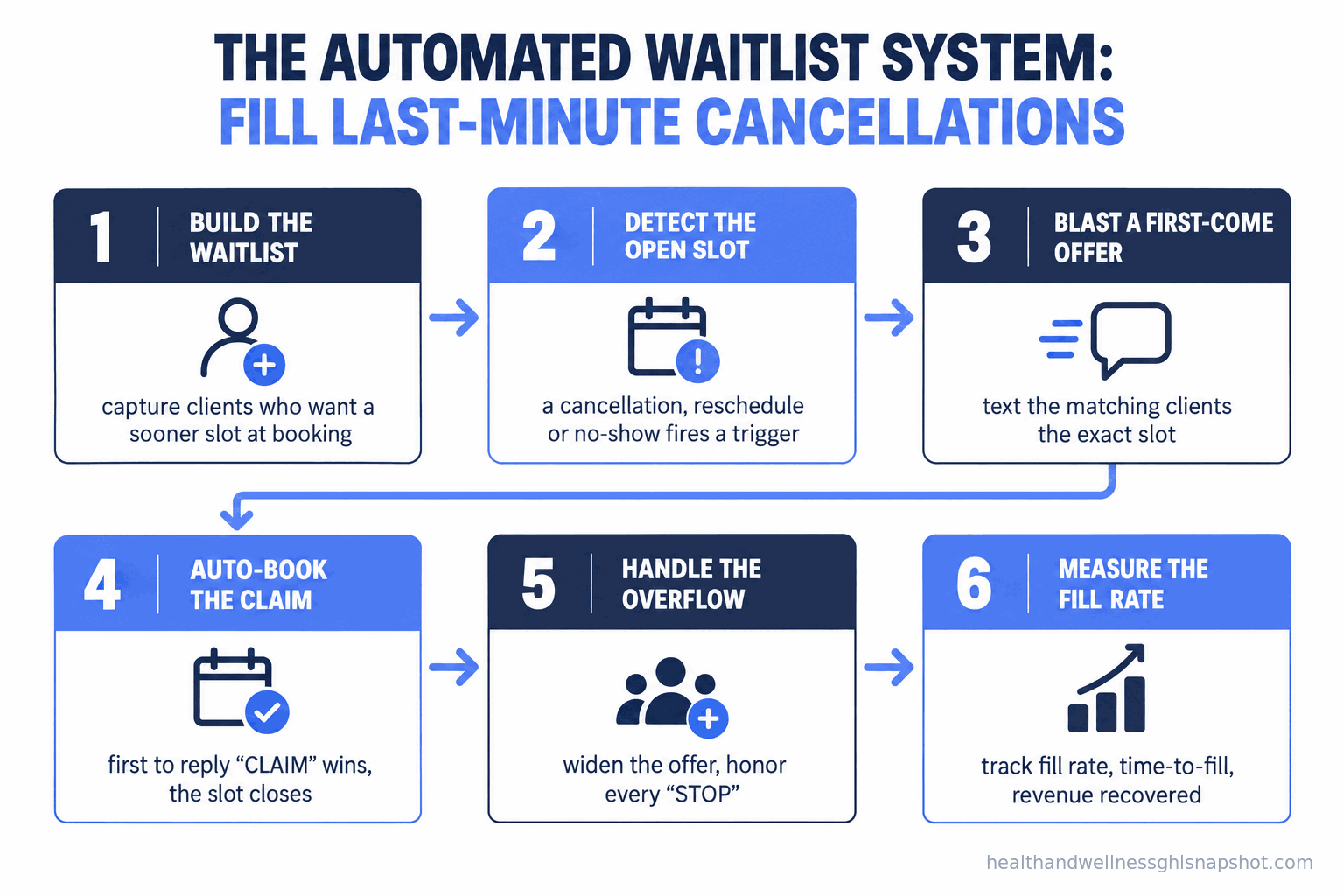
- Build the waitlist so there is always a pool of ready clients to offer a slot to.
- Detect the open slot the moment a cancellation, no-show, or reschedule frees it.
- Blast a first-come offer by text to the clients most likely to take it.
- Auto-book the first to claim it and close the offer to everyone else at once.
- Handle the overflow, the declines, and the slots that only partly fill.
- Measure your fill rate and tune the targeting, timing, and copy.
Every stage below has the same three parts: how to set it up, the copy to send, and the failure mode that quietly kills it. Read the failure modes closely, because almost every owner who tells me “I tried a waitlist and it did nothing” tripped one of them.
Stage 1: Build the waitlist at the moment of booking
You cannot fill a slot from an empty list, so the first stage is capturing clients who would happily come sooner, and the best moment to ask is when they are already booking. A client scheduling three weeks out because that was your first opening is the perfect waitlist candidate. She wanted sooner. She settled for later. If a Tuesday slot opens tomorrow, she may jump at it.
The capture point is your booking flow. When a client books any appointment that is more than a few days out, your system asks a single question: would you like to be texted if an earlier slot opens up? One tap to opt in. That tap does two things. It adds her to a waitlist segment, and it captures express consent to text her about openings, which you will need later for compliance.
Booked for the 14th. Want us to text you if an earlier spot opens sooner? Reply YES to join the priority list, and we will message you the moment something frees up. Reply NO and we will leave your booking as is.
Setup: add the opt-in to your online booking confirmation and to your front-desk script, so both the self-serve and the called-in clients get asked. Tag everyone who says yes into a waitlist segment, and record what treatment and what days or times they actually want, because a glutathione client does not want a hormone-pellet slot. Keep the list fresh by dropping anyone whose original appointment has already passed.
Failure mode: never building the list, or building one giant undifferentiated list. If you only ask the question sometimes, the pool is too thin to fill a slot when you need it. And if you lump every client into one list regardless of treatment or availability, your fill-offer blasts go to people who cannot use the slot, which trains them to ignore your texts. Segment from day one.
Stage 2: Detect the open slot the instant it frees up
The whole system lives or dies on speed, and speed starts with your clinic knowing a slot is open the second it opens, not whenever someone glances at the calendar. A cancellation that sits undetected for two hours is a slot you will not fill. The detection has to be automatic and instant.
There are three ways a slot frees up, and your automation needs to catch all three. A client cancels through your booking link or by replying to a reminder. A client reschedules, which frees the original slot. Or a client no-shows, which you flag a few minutes after the appointment time. Each of these should fire the same trigger: this specific slot, for this specific treatment, at this specific time, is now open.
Setup: wire every cancellation, reschedule, and no-show flag to a single “slot opened” trigger that carries the slot’s date, time, treatment type, and location. If you run two-way SMS reminders, a client replying “cancel” should both cancel the booking and fire the trigger in one motion, which is the kind of connected logic we cover in missed-call text-back and reminder automation. The faster the trigger fires, the more of the remaining time you have to fill the slot.
Failure mode: relying on a human to notice. If filling the slot depends on your front desk catching the cancellation email and remembering to do something, it will not happen on a busy day, which is the exact day you most need it. The front desk is already underwater, a problem we break down in why your clinic’s front desk cannot keep up. Detection must be automatic, or the rest of the system never gets a chance to run.
Stage 3: Blast a first-come offer to the right clients
Once a slot opens, your system texts the waitlist clients who actually want that treatment at that time, offering the slot on a first-come basis. This is where the empty chair gets refilled, and it works because text is nearly instant. Around 90% of texts are read within three minutes of delivery and SMS response rates run near 45% against roughly 6% for email (Sakari 2026). A phone call reaches one person who may not pick up. A text reaches your whole matched segment at once, and the first to tap wins.
Hi [First name], a [treatment] slot just opened at [Clinic] for [day] at [time]. You are on our priority list, so you get first look. Want it? Reply CLAIM and it is yours. First to reply gets the spot.
Keep it short, name the real time, and make claiming a single word. The offer is about logistics and availability, never a health promise, which keeps it clear of FTC trouble. Send it only to the segment that matches the slot, so a 2pm Thursday B12 opening goes to the B12-and-similar clients who wanted a Thursday, not your entire database.
Setup: build the blast to pull the matching waitlist segment and send the moment the “slot opened” trigger fires. Personalize the treatment, day, and time from the slot data so the message is specific. Decide how wide to cast: for a common treatment, offer to the closest-matching handful first; for a slow-to-fill or higher-priced service, widen the net. Route every reply into the claim logic in Stage 4, not to a human inbox nobody is watching.
Failure mode: blasting too wide or too generic. If every opening goes to everyone, clients learn the texts rarely apply to them and stop reading, so the one time a slot is perfect for them, they miss it. And a vague “we have openings this week, call us” is not an offer, it is homework, and almost nobody does it. Name the exact slot and make claiming it one tap.
Stage 4: Auto-book the first to claim it
The instant a client replies CLAIM, your system books her into the slot and closes the offer to everyone else, all in the same second, so you never double-book and never leave the slot hanging. This is the step that separates a real system from a text blast that creates chaos. Without it, three people reply CLAIM, you book one by hand, and the other two show up expecting a slot that is gone. The automation has to settle the race cleanly.
When the first CLAIM lands, three things happen at once. The slot is booked to that client and removed from your open calendar. A confirmation goes to her. And a polite “sorry, just taken” goes to anyone else who replies after. She never has to call, and your calendar updates itself.
To the winner: Done, you are booked for [treatment] on [day] at [time]. See you then. Reply R to reschedule or C if something changes.
To everyone after: That slot was just claimed, sorry. You are still on the priority list, so we will text you the next time something opens. Thanks for being quick.
Setup: make the first valid CLAIM reply book the appointment, send the confirmation, and flip the slot to filled so no later reply can book it. Send the “just taken” message automatically to late repliers so they are not left wondering. If a client who claims then needs to change it, route that to your normal reschedule flow. The booking must be hands-free, because the whole point is to fill the slot faster than a person could.
Failure mode: letting the booking stall on a human step. If CLAIM replies land in an inbox and someone has to manually book them, you have reintroduced the delay the system exists to remove, and you will double-book the day two people reply close together. Also avoid the opposite error of never confirming, which leaves the client unsure she got the slot so she does not show. Book it, confirm it, and close it, automatically.
Stage 5: Handle the overflow, declines, and partial fills
Not every offer gets claimed, and a good system has a clean next move for the slot nobody took, the clients who declined, and the openings that are genuinely hard to fill. This is the stage owners skip, and it is why their first attempt at a waitlist peters out. The messy cases are normal. Plan for them.
If the first narrow blast gets no CLAIM within a set window, say ten or fifteen minutes, the system widens automatically to the next tier of waitlist clients, then to a broader “last-minute openings” list of recent clients who opted in. Some treatments are simply difficult to fill on short notice, and Zenoti notes that locations with heavy rebooking churn see a large share of appointments fail to materialize at all (Zenoti), so the honest goal is a high fill rate, not a perfect one. For the slot that stays empty, the fallback is to use the freed hour for something productive: a standing restock task, a callback to a lapsed client, or a short break your nurse has earned.
Widening blast: Still open: a [treatment] slot [day] at [time] at [Clinic]. First to reply CLAIM gets it. Would love to see you.
To a client who declines: No problem at all, you are staying on the list for next time. Reply STOP any time to come off it.
Setup: build the escalation as timed tiers, narrow first, then wider, then widest, so you exhaust the best-matched clients before bothering the broad list. Honor any STOP or NO instantly and permanently. For the genuinely unfillable slot, trigger a simple internal task so the hour is not wasted. This is also where a dedicated wellness virtual assistant earns their keep, working the small number of warm replies and judgment calls the automation hands off.
Failure mode: either giving up after one blast, or over-messaging the same clients every time a slot opens. One narrow blast and done leaves most fillable slots empty. But texting your whole list every single opening burns goodwill fast, and the clients you most want start tuning out. Tier the escalation, cap how often any one client hears from the waitlist, and respect every opt-out.
Stage 6: Measure your fill rate and tune
A waitlist you do not measure is a guess, so the last stage is tracking how many openings you fill, how fast, and how much revenue you recover, then tuning the parts that underperform. The numbers tell you whether the system is working and exactly where it is leaking. Three metrics matter most.
Fill rate is the share of opened slots that got rebooked through the waitlist. Time-to-fill is how long from the slot opening to a CLAIM. Recovered revenue is fill rate times your average ticket times the number of openings, which is the dollar figure you report to yourself. Watch these monthly and the pattern of what to fix becomes obvious: a low fill rate usually means your list is too thin or your segments are wrong, a slow time-to-fill usually means the detection trigger is lagging, and a high decline rate usually means your offers are going to the wrong people.
Illustrative annual revenue for a solo clinic with one cancelled slot per day at a $216 ticket, six days a week: lost if nothing refills the slot versus recovered at a 50% waitlist fill rate. Inputs: $216 median ticket (Zenoti); your numbers will differ.
Setup: tag every waitlist offer and every CLAIM so your reporting can tie an opening to an outcome. Review fill rate, time-to-fill, and recovered revenue once a month. Adjust one thing at a time, the segment, the timing window, or the copy, so you can tell what actually moved the number.
Failure mode: running the system blind. If you never look at the fill rate, you cannot tell a waitlist that recovers $30,000 a year from one that recovers $3,000, and you will not know which lever to pull. Measure it, or you are flying on vibes.
Run it for your size: solo, three-location, med-spa
The six stages are identical for every clinic, but who runs the human moments and how the automation is structured changes with your size and ownership model. The framework does not bend. The operations around it do.
The solo RN or NP clinic. You are the provider, the injector, the front desk, and the marketing department, so manually working a waitlist is the first thing that collapses on a packed day. Automation is the only version of this that survives your schedule. Set all six stages to run on their own and route only the rare judgment call to your phone. The solo clinic is where this system pays back fastest, because the empty chair hits a smaller calendar harder, and turning that recovered client into a regular is the next move we lay out in turning one-time IV clients into members.
The three-location clinic. Now the risk is drift and cross-booking. You want one centralized waitlist engine so every location fills slots the same way, but each client must be stamped with her home location and time zone so a Dallas opening never gets offered to a Houston client, and a 7am text never fires because your automation ran in the wrong zone. One system, one logic, location-aware routing, and no per-provider fee multiplying across every seat.
The med-spa with a contracted medical director. If you are a non-clinical owner working under an MD or DO medical director, the waitlist and booking automation is entirely yours to run, because it handles logistics, not medicine. Keep the clinical line clean: the texts offer slots and confirm bookings, while anything touching a treatment decision, dosing, or medical eligibility routes to your clinical staff, never an auto-reply. That division keeps your booking automation well clear of scope-of-practice rules.
The compliance lines to respect in 2026
Automating client texts in a medical clinic means staying inside three lines: SMS carrier rules, HIPAA and privacy, and FTC health claims. The waitlist system above is built to clear all three, as long as you know where they are.
SMS carrier rules. Health-related texting draws heavier carrier filtering than retail, so register your numbers for 10DLC, capture a clear and unbundled opt-in when a client joins the waitlist, and honor STOP instantly and permanently. The waitlist opt-in in Stage 1 is where you capture that express consent, which is why the join step matters as much for compliance as it does for building the list. Our HIPAA-aware SMS guide goes deeper on consent and setup.
HIPAA and privacy. If you bill insurance or share client data with a lab or referring physician, you are likely HIPAA-covered and need a signed Business Associate Agreement with any vendor that touches that data. A pure cash-pay IV bar may fall outside federal HIPAA but still owes state privacy and breach-notification duties, so never assume the exemption. Keep every waitlist text to first names, a treatment label, and logistics, never a diagnosis, a result, or anything a stranger reading the screen should not see.
FTC health claims. The FTC sent penalty-offense notices to nearly 700 marketers warning that unsupported product claims can draw civil penalties of up to $50,120 per violation (FTC), and it has specifically pressed IV-therapy marketing. So a fill-offer text must not sell the slot with a promise that the drip “boosts immunity” or “detoxes.” Every message above talks about the slot, the time, and the booking, never a health outcome.
Objections owners raise
“Won’t my clients find the waitlist texts annoying?” Not if you target and cap them. The clients on your waitlist asked to be there, because they wanted a sooner slot. A specific offer for a treatment they want at a time they can make is a favor, not spam. The annoyance only shows up when you blast every opening to everyone, which is exactly what the segmenting and the per-client frequency cap in Stages 3 and 5 are there to prevent.
“I already use a booking tool, doesn’t it do this?” Your booking tool books, and some will keep a basic waitlist, but very few detect a cancellation and fire an instant, segmented, first-come text offer that auto-books the winner and closes the slot. Most wait for a client to come to them. This system goes to the client the second a slot opens. It sits alongside your booking and charting stack and does the one job those tools were never built for, which is why many owners run it on GoHighLevel instead of paying a premium add-on fee, the same trap we unpack in running a clinic membership without the expensive add-on.
“Do I need to be technical to set this up?” No, but it has to be built correctly once, because the failure modes above (speed of detection, segment matching, settling the CLAIM race, time zones, honoring STOP) are exactly what trips a DIY build. You can wire the triggers yourself in GoHighLevel, or install a system where the waitlist capture, the slot detection, the first-come offer, the auto-booking, and the compliance handling are already built and simply switched on. Either way, once it runs, it runs on its own.
“What if two people claim the slot at the same time?” That is the single most important thing the automation handles, and why a manual waitlist fails. The system books the first valid CLAIM, flips the slot to filled, and sends everyone after a polite “just taken” message, all in the same motion. Nobody double-books, and nobody is left thinking they got a slot they did not. Handled properly, the race is a non-event.
Frequently asked questions
Frequently asked questions
How do I fill last-minute cancellations at my clinic automatically?
Build a waitlist of clients who want a sooner slot, captured at booking. Wire every cancellation, reschedule, and no-show to a trigger that detects the open slot instantly. The moment a slot opens, text the matching waitlist clients a first-come offer, auto-book the first to reply CLAIM, and close the slot to everyone else. The whole thing runs in minutes without a human working the phones.
What is the best way to offer an open slot to a waitlist?
Send a short, specific text that names the treatment, day, and time, and makes claiming it a single word like CLAIM, on a first-come basis. Around 90% of texts are read within three minutes, so a text beats a phone-around for speed. Offer only to the segment that matches the slot, so clients keep trusting that your texts apply to them.
How much revenue can an automated waitlist recover?
It depends on your cancellation rate and ticket. A solo clinic losing roughly one slot a day at a $216 median ticket, six days a week, leaves about $65,000 a year on the table if nothing refills those slots. Recovering even half of that through a waitlist is around $33,000 a year, which is why the system pays for itself quickly.
Is it legal to text clients about open appointment slots?
Yes, with express consent and the right setup. Capture a clear, unbundled opt-in when the client joins the waitlist, register your numbers for 10DLC, honor STOP immediately, and keep the text to logistics rather than any health claim. If you bill insurance or share data with a lab you are likely HIPAA-covered and need a Business Associate Agreement with your vendor.
What happens if nobody claims the open slot?
The system widens automatically from your closest-matched clients to a broader last-minute list after a short window. Some slots are genuinely hard to fill on short notice, so the goal is a high fill rate, not a perfect one. For a slot that stays empty, trigger an internal task so the freed hour is used productively instead of just lost.
Does a waitlist work for IV therapy, injectables, and weight-loss visits alike?
Yes, as long as you segment by treatment and availability. A glutathione client should not get offered a hormone-pellet slot, and a weekday-only client should not get a Saturday offer. Capture what each client actually wants at opt-in, and match the fill offer to the slot, and the same six-stage system works across every service you run.
Back to that Saturday morning. In the version without a system, your 9:30 cancels, the chair sits empty until 10:00, and you eat the loss while telling yourself there was nothing you could do. In the version with the waitlist running, the cancellation fires a trigger at 9:12, a glutathione client who wanted a sooner Saturday slot gets the offer at 9:13, she taps CLAIM at 9:16, and she is checked in and in the chair by 9:35. Same cancellation, same empty twenty minutes. The only thing that changed is that this time, something reached out and filled the chair before it ever had the chance to cost you.