A prospect in Lincoln Park opens your Chicago functional-medicine clinic’s website at 9:47pm. She wants to know one thing before she books: do you actually help with hormone issues, or just weight loss? There’s no one to ask. The contact form promises a reply “within 1–2 business days.” She closes the tab and books with the clinic down the street whose site answered her in ten seconds. You never knew she existed.
To add an AI chat widget to a wellness website, you connect a conversational AI to your site that greets every visitor instantly, answers your practice’s real questions, qualifies the person, and books the consult into your calendar — 24/7, without a human on shift. Done right, it captures the 43% of healthcare appointments that get booked after office hours (Zocdoc, 2025) and meets the 82% of visitors who expect an immediate response the moment they start a chat (HubSpot). This is the exact 7-step build we use for Chicago wellness practices — every number below is cited.
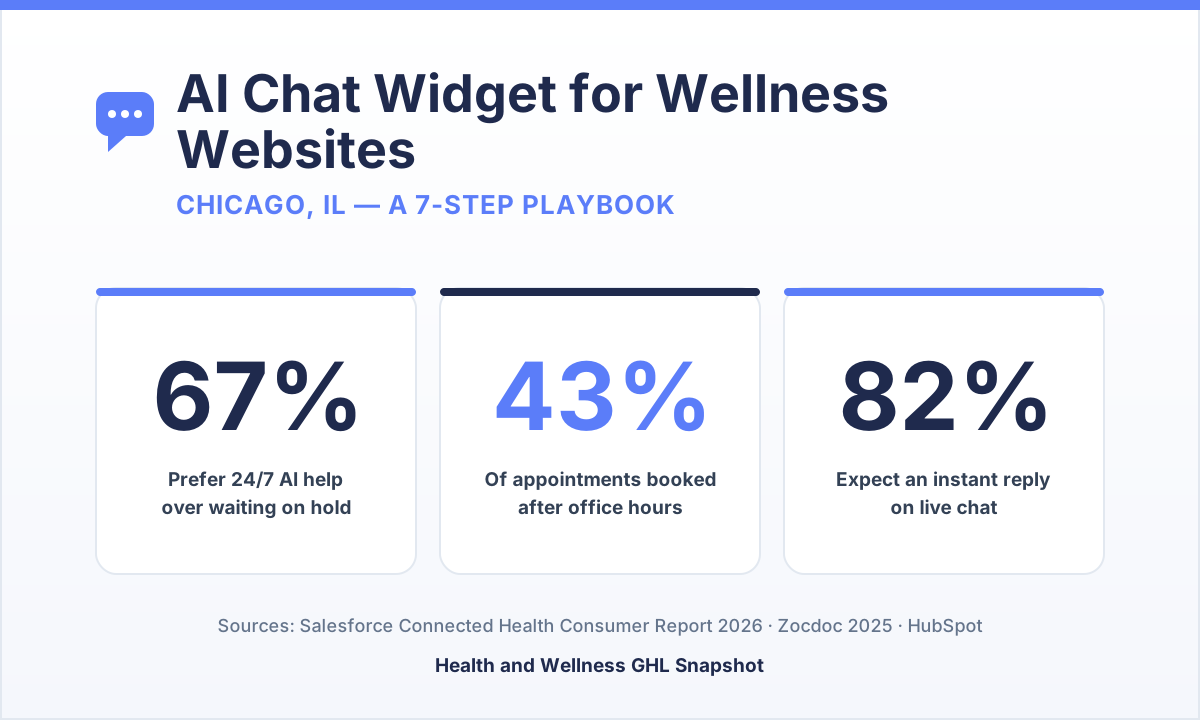
Table of contents
- Why a Chicago wellness site needs a chat widget now
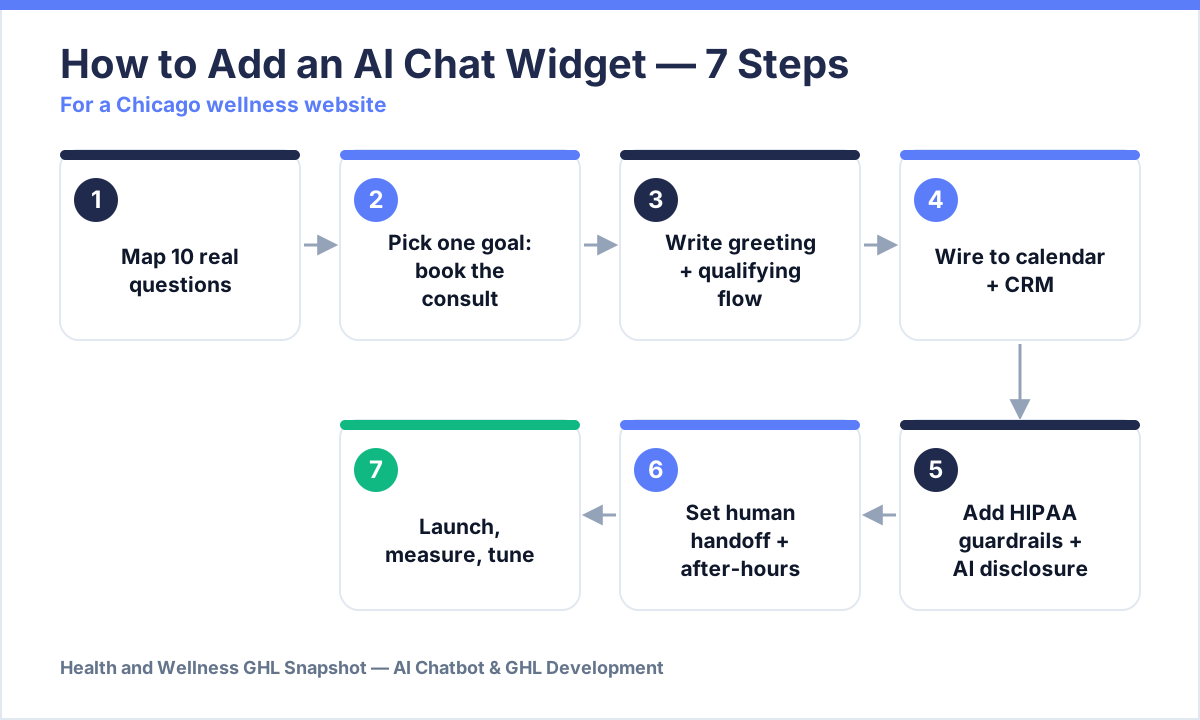
- Step 1 — Map the 10 questions it must answer
- Step 2 — Pick one goal and one home
- Step 3 — Write the greeting and qualifying flow
- Step 4 — Wire it to your calendar and CRM
- Step 5 — Add HIPAA-aware guardrails and AI disclosure
- Step 6 — Set the human handoff and after-hours fallback
- Step 7 — Launch, measure, and tune
- Frequently asked questions
Why a Chicago wellness site needs a chat widget now
Chicago wellness prospects search and decide on their own schedule — usually after work, on a phone, when your front desk is closed. Zocdoc’s 2025 platform data shows 43% of appointments are now booked after office hours, up from 37% in 2022, with roughly 28% landing in the evening (5–11pm) and 14% overnight (Zocdoc, 2025). Chicago runs on Central Time; a nutrition coach in Wicker Park is asleep while a shift worker in Pilsen is deciding whether to book.
When healthcare appointments are booked, share of total. Source: Zocdoc, “What Patients Want,” 2025.
The demand isn’t just late — it’s impatient and it prefers automation. 67% of patients say they’d rather have 24/7 AI help than wait on hold, and 58% admit they skip or delay care because scheduling is too hard (Salesforce, 2026). Meanwhile 82% of people expect an immediate reply the second they open a chat (HubSpot), and Gartner projects that by 2027 chatbots will be the primary customer-service channel for a quarter of organizations (Gartner). Illinois is home to 1.2 million small businesses — 99.6% of all businesses in the state (SBA, 2025) — which means the wellness prospect comparing you to three other Chicago clinics will book whichever site answers first. Here’s how to make that site yours, in seven steps.
Step 1 — Map the 10 questions it must answer
Before any tool, write down the ten questions real prospects actually ask — then let the widget answer those, in your voice. Don’t guess. Pull them from three places: your last 20 discovery-call recordings, your Instagram and Facebook DMs, and the “reply to this email” questions in your inbox. For a Chicago functional-medicine or weight-loss practice, the list almost always includes: Do you treat my specific issue? Are you in-network / do you take insurance? How much is a program? Where are you located / do you offer virtual? What happens on the first visit? How soon can I get in? Do you offer a free consult?
Write a tight, accurate answer for each — the kind you’d give on the phone, not marketing fluff. This document becomes the widget’s knowledge base. A well-scoped knowledge base is why modern AI agents can resolve roughly half to two-thirds of routine inquiries without a human touching them (Intercom reports a ~67% resolution rate for its Fin agent over a rolling 30 days; independent setups land lower, so treat that as a ceiling, not a promise) (Intercom). The narrower and more honest your answers, the higher your real resolution rate — and the fewer prospects bounce to a competitor.
Step 2 — Pick one goal and one home
A wellness chat widget with two goals converts on neither — pick “book the consult” as the single primary action, everything else supports it. Every path in the conversation should bend toward a booked appointment or, at minimum, a captured name, phone, and reason-for-visit. Secondary outcomes (answering a pricing question, sending a lead magnet) are fine — but they exist to earn the booking, not replace it.
Then decide where it lives. At minimum it belongs on your homepage and your services/pricing pages — the pages with buying intent. But the same conversational engine should also cover the channels where Chicago wellness prospects actually message you: your website, Instagram DMs, and Facebook Messenger. 91% of U.S. adults own a smartphone (Pew, 2024), so most of these conversations happen on a phone, mid-scroll — the widget must be tap-friendly and load instantly. If you already capture leads from social, connect it to your Instagram DM flow so a comment, a DM, and a website chat all feed the same pipeline instead of three disconnected inboxes.
Step 3 — Write the greeting and qualifying flow
The greeting has one job: get the visitor talking within the first five seconds, because 66% of people expect a reply within five minutes and won’t wait. Open with a specific, human line, not a robotic “How can I help you today?” For a hormone-balance clinic: “Hi 👋 Want to see if our program’s a fit for what you’re dealing with? Ask me anything, or I can check the calendar.” Specificity signals you understand the person’s problem.
From there, the flow qualifies gently while it helps. Three or four questions is plenty: what brings you in, have you worked with a practitioner before, are you looking to start soon, and what’s the best number to text you the details. Each answer gets tagged so your team sees a warm, pre-qualified lead — not a cold “someone chatted.” Keep the tone calm and compliance-aware: this is wellness, not a used-car lot. The payoff for answering fast is enormous. In the classic Harvard Business Review study of 2,241 companies, firms that contacted a web lead within an hour were nearly 7× more likely to qualify it than those that waited even one hour longer — and 60× more likely than those who waited 24 hours. The average company took 42 hours to respond (HBR).
Relative likelihood of qualifying an online lead vs. waiting 24+ hours. Source: Harvard Business Review, “The Short Life of Online Sales Leads.”
Step 4 — Wire it to your calendar and CRM
A chat widget that can’t book is just a fancier contact form — the conversion happens when the AI drops the visitor straight onto a live calendar slot. This is the step that separates a toy from a system. When the qualifying flow ends, the widget should show real, open appointment times, take the booking, send the confirmation, and create the contact record — all inside the conversation. No “someone will call you to schedule.”
In practice, we build this in GoHighLevel: the chat connects to the practice’s calendar, creates or updates the CRM contact, applies tags (source, service interest, urgency), and fires the follow-up workflow automatically. That means the same booking also triggers appointment reminders and no-show recovery, and every captured lead flows into nurture even if they didn’t book yet. The AI Chatbot that ships in the Wellness Snapshot is wired to exactly this — website and social chat that books appointments into GHL — and if you need a custom build or an integration with your EHR/booking tool, that’s what our GHL development team does (custom AI intake chatbots typically run $5K–$15K). The point isn’t the tool; it’s that the calendar, the CRM, and the follow-up are one connected loop.
Step 5 — Add HIPAA-aware guardrails and AI disclosure
In a wellness practice, the chat widget touches sensitive territory, so build the guardrails before you build the charm. Three rules keep you clean:
- Don’t collect PHI in the chat. The widget qualifies and books — it does not ask for diagnoses, medications, or detailed medical history. Keep clinical intake inside your secure intake forms, not the public chat thread.
- Gate consent for texting. If the flow captures a phone number to text appointment details, capture explicit SMS consent in the same step — the TCPA rules that govern your missed-call text-back apply here too. One checkbox line, logged with a timestamp.
- Disclose that it’s AI. 54% of consumers say they want to know when they’re talking to AI rather than a human (Twilio, 2025). A single honest line — “You’re chatting with our practice’s assistant; a team member reviews every booking” — builds trust and keeps you aligned with FTC guidance on AI transparency.
Remember the frame: the Wellness Snapshot and its chat widget are marketing-and-operations tools. Each licensed practitioner remains responsible for their own HIPAA obligations, clinical claims, and state compliance. The widget sets up compliant workflows; the accountability for your client communications stays with you.
Step 6 — Set the human handoff and after-hours fallback
The best AI chat widgets know when to step aside — and never leave a real question hanging until morning. Two mechanisms make that work. First, a human handoff: any time the AI hits a question outside its knowledge base, or the visitor types something urgent or emotional, it should offer to connect a person and route the transcript to your team (or your wellness VA) with full context. Second, an after-hours fallback: if no human is available at 11pm, the widget still books the consult, captures the number, and promises a specific next step (“Dr. Okafor’s team will confirm your intake by 9am CT”) — then a workflow actually delivers on it.
This is also where the chat widget stops being a silo. Tie it to your phone system so a missed call after hours triggers the same booking flow by text — the mechanics we break down in missed-call text-back for wellness practices and the broader speed-to-lead playbook. The goal is a single promise the practice can always keep: no question unanswered, no lead un-booked, no matter the hour.
A Chicago wellness website, before and after the widget
Contact form promises a reply 'within 1–2 business days.' Evening and weekend visitors get silence, bounce to a competitor, and never resurface. The team spends mornings answering the same five questions by phone and DM.
An AI chat widget greets every visitor in seconds, answers the real questions in the practice's voice, qualifies the person, and books the consult into GoHighLevel — 24/7. After-hours bookings land while the office is dark; the team wakes up to confirmed, pre-qualified appointments.
Step 7 — Launch, measure, and tune
Ship it, then treat the first 30 days as a tuning window — the metrics tell you exactly what to fix. Track four numbers: resolution rate (share of chats the AI handled without a human), booked consults from chat, median first-response time (it should read in seconds), and capture rate (chats that left a name + number). If resolution is low, your knowledge base has gaps — read the transcripts and add the missing answers. If capture is low, your qualifying flow is asking too much too soon.
Read the actual conversations weekly for the first month. You’ll find real Chicago prospects asking things you never anticipated (“do you have parking near the Loop office?”, “can I use my HSA?”) — every one becomes a new answer that lifts your resolution rate. Within a few weeks the widget compounds: it gets sharper, the team fields fewer repetitive questions, and more of the 43% who show up after hours turn into booked, kept appointments. That’s the whole point — you built the front desk that never sleeps, and now it just needs feeding.
The done-for-you route
If you’d rather not build and maintain this yourself, the AI Chatbot inside the Wellness Snapshot ships pre-wired to book appointments and feed your GoHighLevel pipeline, and our GHL development team builds custom chat widgets and EHR integrations for practices with specific needs. Pair it with local SEO for wellness practitioners so the traffic finding your Chicago site actually has something that converts it — and see the full pricing for the snapshot. Either way, the standard is the same: answer every visitor, qualify every lead, and book the consult while your competitors’ contact forms are still promising a reply “within 1–2 business days.”
Frequently asked questions
AI chat widget for wellness websites — FAQ
What is an AI chat widget for a wellness website?
It's a conversational AI that lives on your website (and optionally Instagram and Facebook) and greets every visitor instantly, answers your practice's real questions in your voice, qualifies the person, and books the consult into your calendar — 24/7, without a human on shift. Unlike a contact form, it replies in seconds and can actually complete the booking inside the conversation.
Why does a Chicago wellness practice need one specifically?
Because Chicago prospects search and decide after hours, on Central Time, mostly on their phones. Zocdoc's 2025 data shows 43% of healthcare appointments are booked after office hours (about 28% evening, 14% overnight), and 82% of people expect an immediate reply when they open a chat (HubSpot). A form that promises a reply in 1–2 business days loses those bookings to whichever local clinic answered first.
Is an AI chat widget HIPAA-compliant?
The widget itself should be built to avoid collecting PHI — it qualifies and books rather than taking medical history, and it captures explicit SMS consent (TCPA) when it gathers a phone number. Clinical intake stays inside your secure forms, not the public chat. Each licensed practitioner remains responsible for their own HIPAA obligations and state compliance; the widget sets up compliant workflows, but accountability for your client communications stays with you.
Should I tell visitors they're chatting with AI?
Yes. 54% of consumers say they want to know when they're interacting with AI rather than a human (Twilio, 2025), and honest disclosure builds trust and aligns with FTC guidance. A single line — 'You're chatting with our practice's assistant; a team member reviews every booking' — is enough.
How much does it cost to add an AI chat widget?
It ships pre-built as the AI Chatbot feature inside the Wellness Snapshot, wired to book into GoHighLevel. For custom builds or EHR/booking integrations, our GHL development team's custom AI intake chatbots typically run $5K–$15K depending on scope. Book a call for a fixed quote.
What can an AI chat widget actually handle without a human?
With a well-scoped knowledge base, modern AI agents resolve roughly half to two-thirds of routine inquiries — answering FAQs, qualifying, and booking — while escalating anything clinical or urgent to a person. Intercom reports around a 67% resolution rate for its Fin agent over a rolling 30 days; real-world results depend heavily on how well you scripted the answers in Step 1, so treat that as a ceiling to work toward.
Written by Kwame Adeyemi, GHL Snapshot Engineer. Kwame builds and stress-tests the workflows that ship inside the Wellness Snapshot — including the chat, booking, and SMS-consent logic described here. He cares about the quiet failure modes that lose a practice a booking. Kwame writes about GoHighLevel automation and wellness-practice operations; he is not a licensed healthcare provider, and nothing here is medical, legal, or compliance advice. Statistics are drawn from the cited public sources; vendor resolution-rate figures are presented as ranges, not guarantees.
Keep reading: Speed to Lead: Why the First 5 Minutes Decide the Client · Missed-Call Text-Back for Wellness Practices · The AI Receptionist Playbook for Wellness Practices · Get Wellness Clients From Instagram · Reduce Appointment No-Shows