A Charlotte nutrition coach opens her laptop on a Monday and touches six tools before her first client: Calendly for bookings, Mailchimp for the newsletter, a separate SMS app for reminders, a Google Sheet tracking who’s due for a check-in, Stripe for billing, and Instagram DMs where half her new leads actually live. Nothing talks to anything. A cancellation in Calendly never reaches the spreadsheet; a paid invoice never triggers the onboarding email. She isn’t running a practice — she’s the integration layer holding six apps together with her own attention.
Migrating a wellness practice to GoHighLevel means consolidating those scattered tools — CRM, calendar, email, SMS, forms, pipelines, and payments — into one platform, and the safe way to do it is a staged, parallel-run migration: export and clean your data, map it to GoHighLevel fields, rebuild your core automations, run both systems side by side for one to two weeks, then cut over once every booking and message fires correctly. This playbook walks a Charlotte, North Carolina practice through that move step by step — what to migrate, what to retire, how to protect client data and SMS consent, and how to decide between a DIY migration and a done-for-you build. Every statistic below is sourced, and the honest caveat runs throughout: your timeline depends on how messy your current data is and how many automations you actually rely on.
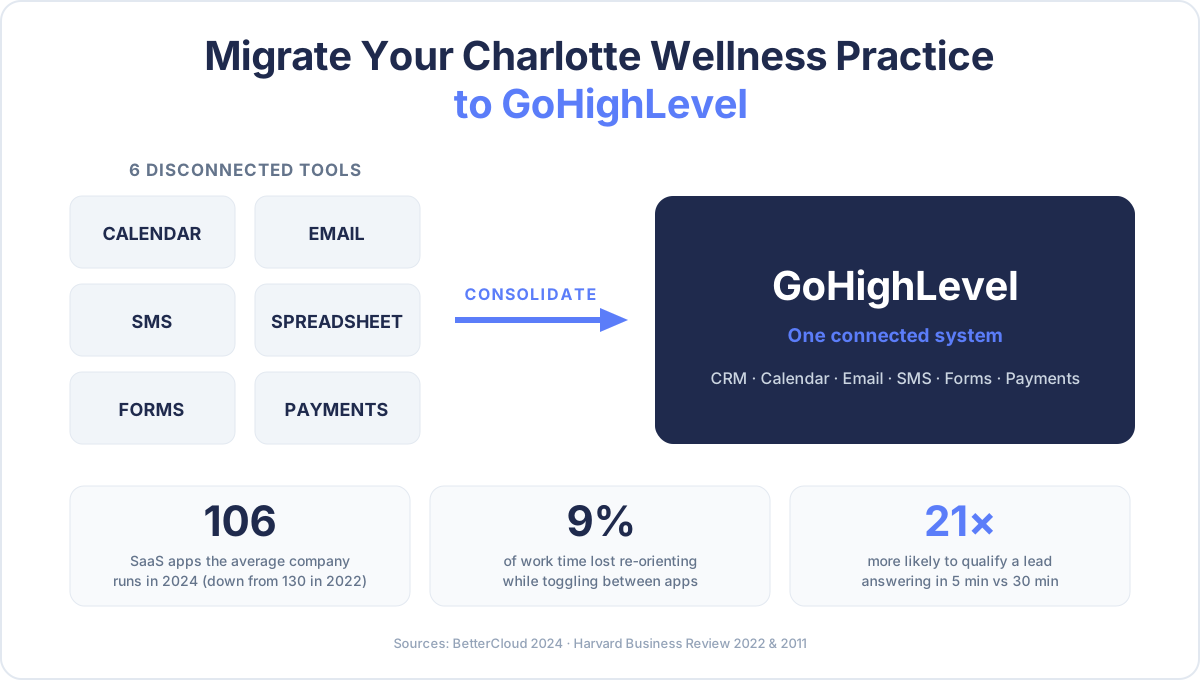
Table of contents
- What “migrating to GoHighLevel” actually means
- Why Charlotte wellness practices end up with a tangled stack
- The real cost of a disconnected tech stack
- The 7-step GoHighLevel migration playbook
- How to migrate without losing clients or data
- What to retire, what to keep
- DIY vs done-for-you migration
- Frequently asked questions
What “migrating to GoHighLevel” actually means
Migrating to GoHighLevel is the process of moving the operational core of your practice — your client list, calendars, forms, email and SMS sequences, pipelines, and payments — off a collection of single-purpose apps and into one connected system where a change in one place updates everywhere. It is not “signing up for another tool.” Done right, it’s the opposite: it’s the move that lets you cancel several tools.
For a wellness practice, the pieces that migrate are specific:
- Contacts and history — every client and lead, with their tags, notes, program, and consent status.
- Calendars and booking — your consult and session calendars, availability rules, and reminder logic (the Calendly replacement).
- Communication — email newsletters and nurture sequences (the Mailchimp replacement) plus two-way SMS (the standalone-texting-app replacement).
- Forms and intake — discovery-call forms, intake questionnaires, and consent capture.
- Pipelines — the stages a client moves through: new lead → consult booked → program started → renewal due.
- Payments — checkout, invoices, and recurring billing.
The reason practices consolidate is straightforward: the average organization is actively cutting tools, with SaaS counts falling from 130 apps per company in 2022 to 106 in 2024 (BetterCloud, 2024). Consolidation is the trend, not the exception — and GoHighLevel is purpose-built to be the platform several wellness tools collapse into. If you’re weighing whether an all-in-one is worth it at all, our Wellness Snapshot vs. DIY breakdown covers that decision separately; this piece assumes you’ve decided to consolidate and want to do it safely.
Why Charlotte wellness practices end up with a tangled stack
Nobody chooses six disconnected apps on purpose. It accumulates. You start with a booking link because a client asked to self-schedule. You add an email tool for the newsletter. A no-show pushes you to a texting app. Tax season adds an invoicing tool. Each decision is reasonable; the sum is a stack that only you can operate.
Charlotte makes this sharper than most markets. North Carolina has 1.1 million small businesses, which is 99.6% of all businesses in the state, and they employ 44.2% of the state’s workforce (U.S. Small Business Administration, 2025). Translation: a Charlotte wellness practice is competing in a dense field of other small, owner-run operations for the same clients — and the one who replies first and follows up consistently wins. That’s hard to do when your reply depends on you personally noticing a lead in one app and manually acting on it in another.
The tax for running that stack is measurable. Knowledge workers toggle between applications about 1,200 times per day and lose close to 4 hours a week — roughly 9% of their working time — just re-orienting after each switch (Harvard Business Review, 2022). For a practitioner whose billable time is the business, four hours a week of app-shuffling is four hours not spent with clients or growing the practice.
Average number of SaaS applications per company, 2022–2024 — the first sustained decline in over a decade as businesses consolidate their stacks. Source: BetterCloud, 2024.
The real cost of a disconnected tech stack
The tangle isn’t just annoying — it leaks money in two specific places.
First, it leaks leads. When your booking tool and your follow-up tool don’t share data, a new inquiry sits until you personally move it. And speed is decisive: practices that respond to a web lead within five minutes are up to 21× more likely to qualify that lead than those who wait just 30 minutes (Harvard Business Review, 2011). A disconnected stack almost guarantees a slow reply, because the reply depends on a human catching it. This is the same speed-to-lead logic behind missed-call text-back — automation replies in seconds; a person juggling six tabs replies in hours, if at all.
Relative likelihood of qualifying a new lead by response time (30-minute response indexed to 1). Source: Harvard Business Review / MIT Lead Response Management, 2011.
Second, it rots your data. Every tool holds a slightly different version of each client — one has the current phone number, another the old email, a third the wrong program. That drift has a price: poor data quality costs organizations an average of $12.9 million a year (Gartner, 2021). At a solo-practice scale that shows up as a renewal reminder sent to a lapsed address, or a check-in that never fires because the spreadsheet and the CRM disagree about who’s active.
The upside of fixing it is well documented. Business owners who automate report saving a median of about 5 hours a week, and their employees a median of about 11.5 hours (Zapier, 2024). Consolidating into GoHighLevel is how a wellness practice claims those hours — but only if the migration itself doesn’t cost you clients or data on the way. That’s the rest of this playbook.
The 7-step GoHighLevel migration playbook
Here is the sequence a careful migration follows. Treat it as a checklist, not a race — the goal is that on cutover day, nothing your clients touch changes except that it works better.
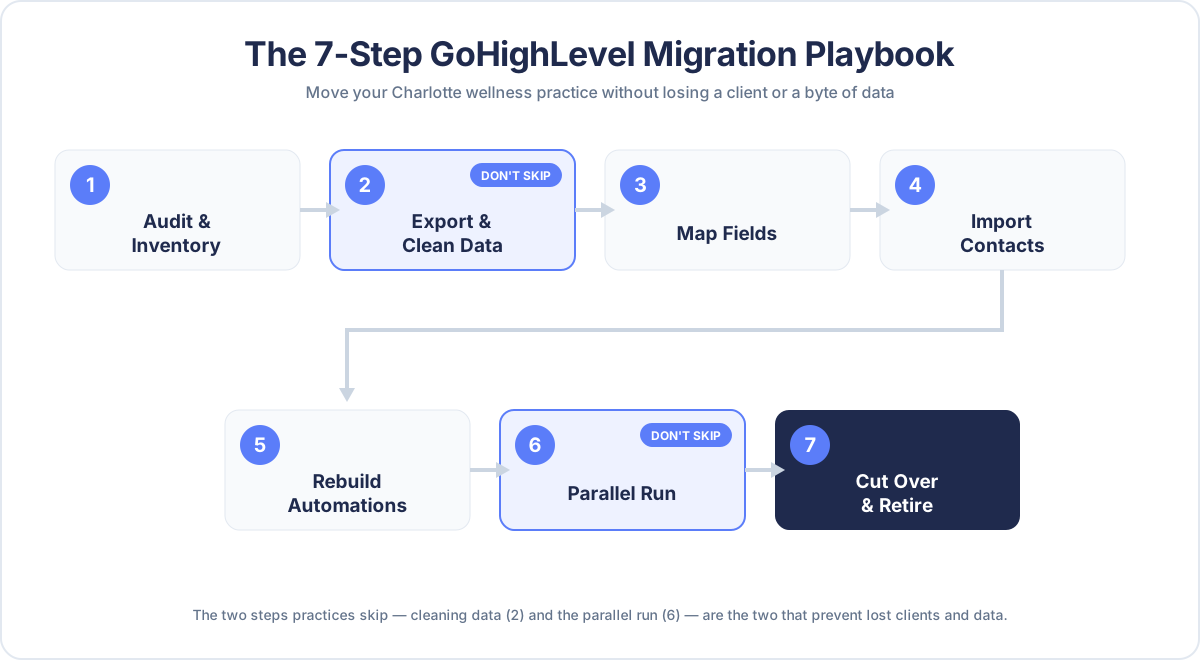
- Audit and inventory. List every tool you use, what data lives in each, and which automations you actually depend on. You’ll almost always find you rely on fewer than you own.
- Export and clean your data. Pull contacts, appointments, and email lists to CSV. Deduplicate, fix formatting, and standardize phone numbers and tags before import — cleaning is cheaper now than debugging a broken automation later.
- Map your fields. Decide how each column becomes a GoHighLevel field: which spreadsheet columns become custom fields, how “active/lapsed” becomes a tag or pipeline stage, how consent status carries over.
- Import contacts and rebuild structure. Load the cleaned data, recreate your pipelines (new lead → consult → program → renewal), and set up your calendars and booking rules.
- Rebuild your core automations. Recreate the sequences that matter first: consult booking + reminders, onboarding, daily or weekly check-ins, and renewal pre-warm. See our client-onboarding automation guide for the sequence structure.
- Run both systems in parallel. For one to two weeks, keep the old tools live while the new booking link and automations run alongside. Watch every trigger fire on a real client before you trust it.
- Cut over and retire. Once bookings, reminders, and payments all fire correctly in GoHighLevel, switch your public links, redirect your number, and cancel the tools you’ve replaced.
The two steps people skip — cleaning data (step 2) and the parallel run (step 6) — are exactly the two that prevent lost clients and lost data. Don’t skip them.
How to migrate without losing clients or data
The migration itself carries three real risks. Each has a specific safeguard.
Risk 1: Contacts or history get dropped. The safeguard is a reconciliation count. Before you retire anything, confirm the number of contacts, active clients, and upcoming appointments in GoHighLevel matches the source. A migration isn’t done when the import “succeeds” — it’s done when the counts reconcile and you’ve spot-checked a sample of real client records for correct tags, program, and notes.
Risk 2: SMS consent breaks. This is the one that gets wellness practices in trouble. Consent doesn’t automatically transfer — you must carry over each contact’s opt-in status and honor prior STOP requests, or you risk texting people who never agreed to be texted. Migrate the consent field explicitly, keep proof of opt-in, and don’t blast a “we’ve moved!” text to contacts who never consented to SMS. Our HIPAA-aware SMS guide covers the consent mechanics in detail; treat it as required reading before you send a single message from the new system.
Risk 3: A booking or payment silently fails at cutover. The safeguard is the parallel run (step 6) plus a live test of every money-touching flow: book a real consult, trigger a real reminder, run a real test payment, and confirm the confirmation and receipt actually arrive. The reason to run both systems side by side isn’t caution for its own sake — it’s so the first time a client hits your new booking flow isn’t also the first time you find out it’s broken.
What to retire, what to keep
Not everything should collapse into GoHighLevel, and pretending otherwise is how migrations stall. Here’s the honest split for a typical wellness practice.
| Function | Move into GoHighLevel | Often keep separate |
|---|---|---|
| Booking & calendars | ✅ Replaces Calendly / Acuity | — |
| Email & SMS follow-up | ✅ Replaces Mailchimp + texting app | — |
| Forms & intake | ✅ Discovery, intake, consent capture | Specialized clinical/EHR intake if you use one |
| Pipelines & CRM | ✅ Replaces the tracking spreadsheet | — |
| Payments & recurring billing | ✅ Native checkout & invoices | Existing merchant processor if rates are better |
| Protected health information | ⚠️ Only within a signed BAA and your compliance model | Dedicated HIPAA-covered EHR for clinical records |
| Bookkeeping / accounting | — | Keep your accountant’s tool (QuickBooks, etc.) |
The pattern: operational and marketing workflows consolidate; specialized clinical and financial systems of record usually stay put and connect via integration. A good migration reduces your tool count meaningfully — it doesn’t force every function into one box regardless of fit. If you have a clinical portal you’re deciding about, our client portal vs. Google Drive comparison walks through when a purpose-built system earns its place.
DIY vs done-for-you migration
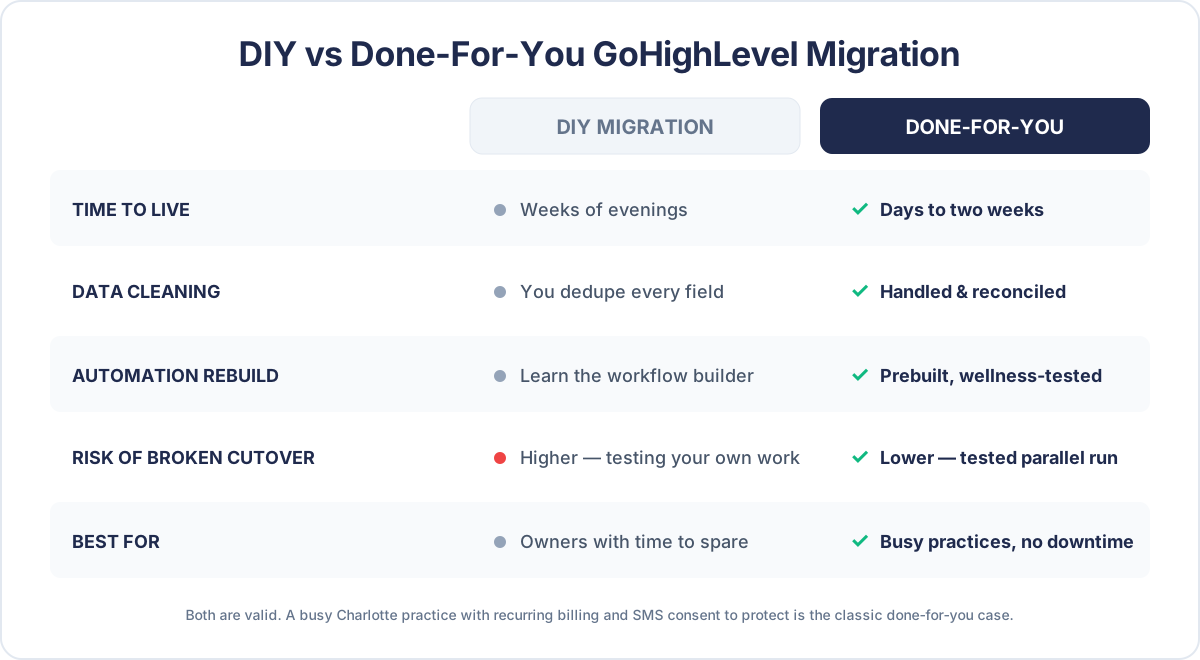
You can migrate yourself. The question is whether the time and risk are worth it versus having it built for you. Here’s the straight comparison.
| DIY migration | Done-for-you migration | |
|---|---|---|
| Upfront cost | Your time only | A project fee |
| Time to live | Weeks of evenings, spread over months | Days to a couple of weeks |
| Data cleaning | You dedupe and map every field | Handled and reconciled for you |
| Automation rebuild | You learn GHL’s workflow builder | Prebuilt, wellness-tested workflows |
| Risk of a broken cutover | Higher — you’re testing your own work | Lower — a tested parallel run and reconciliation |
| Best for | Tech-comfortable owners with time | Practices that can’t afford downtime or lost leads |
There’s no universally right answer. A tech-comfortable coach with a light client load and a free month can absolutely DIY it. A busy Charlotte clinic with hundreds of active clients, recurring billing, and SMS consent to protect is exactly the case where a done-for-you migration pays for itself — because the cost of a dropped renewal cycle or a consent violation dwarfs the project fee.
That’s the path we build. Our team handles GoHighLevel migrations and custom development — auditing your stack, cleaning and importing your data, rebuilding your automations, and running the parallel test — so you switch without downtime. If you’d rather keep running the system after it’s live but not operate it yourself day to day, a dedicated wellness VA can run your GoHighLevel while you run your practice.
Frequently asked questions
GoHighLevel migration for wellness practices — FAQ
How long does a GoHighLevel migration take for a wellness practice?
It depends almost entirely on how messy your current data is and how many automations you rely on. A solo practice with clean contacts and a handful of sequences can migrate in a few days to two weeks; a multi-coach Charlotte clinic with recurring billing, hundreds of active clients, and SMS consent to preserve typically takes two to four weeks including a parallel-run test. The single biggest time variable is data cleaning — the cleaner your export, the faster and safer the import.
Will I lose client data or history when I switch to GoHighLevel?
Not if you migrate in stages. The safeguards are a data export and clean before import, a field-by-field mapping, and a reconciliation step where the contact, active-client, and appointment counts in GoHighLevel must match the source before you retire anything. You also keep a read-only export of the old data for at least 90 days as a rollback safety net. Data is lost when practices skip cleaning and reconciliation and cut over blind — not when the move is staged.
What happens to my clients' SMS consent when I migrate?
Consent does not transfer automatically, and this is the highest-risk part of any migration. You must carry over each contact's opt-in status, honor prior STOP requests, and keep proof of opt-in before sending any message from the new system. Do not send a bulk 'we've moved' text to contacts who never consented to SMS. Migrate the consent field explicitly and treat TCPA and HIPAA-aware SMS rules as non-negotiable.
Which tools does GoHighLevel actually replace for a wellness practice?
For most practices it replaces the booking tool (Calendly/Acuity), the email platform (Mailchimp), a standalone SMS app, the tracking spreadsheet, and often the checkout and invoicing tool — consolidating booking, CRM, email, SMS, forms, pipelines, and payments into one system. Specialized clinical EHR records and your accountant's bookkeeping software usually stay separate and connect via integration rather than being forced into GoHighLevel.
Should a Charlotte wellness practice migrate itself or hire it out?
A tech-comfortable owner with a light client load and time to spare can DIY it. A busy practice with active recurring billing, a large client base, and SMS consent to protect is the classic case for a done-for-you migration, because the cost of a broken cutover — a dropped renewal cycle, a consent violation, a booking flow that silently fails — is far larger than the project fee. Our team runs the whole staged migration so you switch without downtime.
About the author
Maya Ellison is a Wellness Automation Strategist based in Asheville, North Carolina. She spent six years running operations for a multi-coach nutrition studio before going all-in on GoHighLevel automation, and she is obsessed with the unglamorous middle of a wellness practice — the onboarding, the check-ins, the renewals — because that’s where retention is quietly won or lost. She is not a licensed healthcare provider; her expertise is in wellness-practice operations, GoHighLevel workflow design, and marketing, not clinical care.