
A prospective client in Dallas searches “functional medicine near me” on their phone during a lunch break, taps your practice, and waits. Your WordPress site is still loading its slider, its cookie banner, its chat plugin, and three fonts. Two seconds pass. Three. They tap back to Google and open the next clinic — one whose page appeared instantly. You never showed up in their decision, and you never knew they were there.
For a Dallas wellness practice, an Astro-built website is materially faster than a typical WordPress site because it ships pre-rendered HTML from the edge with almost no JavaScript, while WordPress renders each page through PHP, a database, and a stack of plugins on every request — and that speed gap directly changes how many local clients bounce, convert, and find you in search. This comparison lays out the sourced data on page speed, Core Web Vitals, and local SEO, shows exactly where WordPress slows down, and gives an honest account of the trade-offs — including who should not switch. Every statistic below is cited.
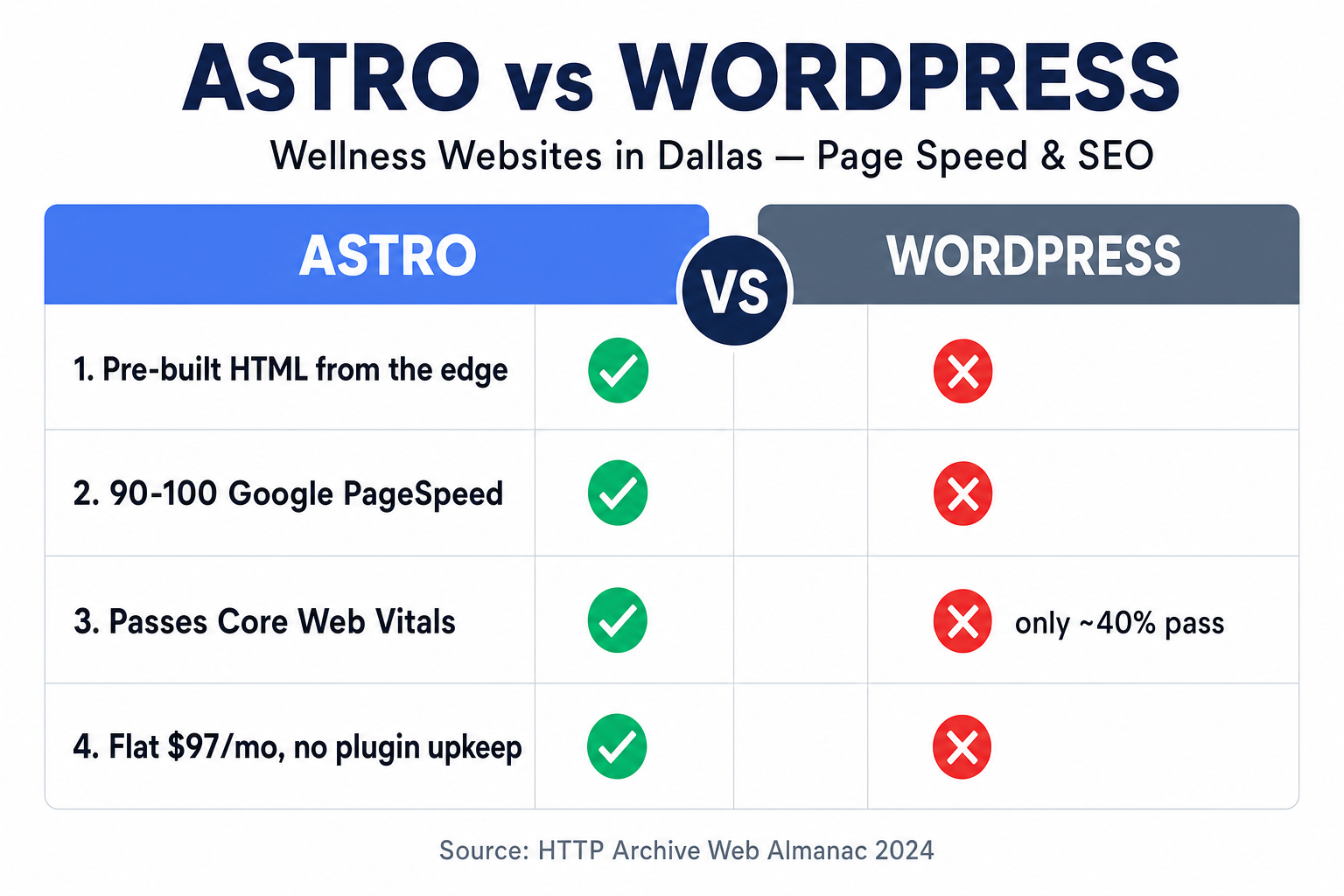
Table of contents
- Astro vs WordPress at a glance
- Why website speed decides whether a Dallas client books
- Core Web Vitals: the SEO scorecard Google actually uses
- Where WordPress slows down — and why it isn’t your fault
- How Astro is different
- The full comparison
- What this means for a Dallas wellness practice
- Honest caveats: who should not switch
- Frequently asked questions
Astro vs WordPress at a glance
Astro is a modern framework that builds your pages ahead of time into plain HTML and serves them instantly from a global edge network; WordPress is a database-driven CMS that assembles each page on the fly through PHP and plugins. For a content site that changes occasionally — which is exactly what a wellness practice’s marketing site is — the pre-built approach is dramatically faster, because the hard work happens once at build time instead of on every single visitor’s request.
That architectural difference is the whole story. WordPress’s flexibility comes from doing work on demand: a request arrives, PHP runs, the database is queried, a theme renders, and a stack of plugins fires — then the page is sent. Astro does that assembly once when the site is built and caches the finished HTML at the edge, so a Dallas visitor gets a file that’s already done, served from a nearby data center. Everything below follows from that.
Why website speed decides whether a Dallas client books
In wellness, the website is the front door, and a slow front door is one visitors walk away from before they ever knock. The behavior is well documented: roughly 53% of mobile site visits are abandoned if the page takes longer than three seconds to load (Google, 2016/2017). Because most “near me” wellness searches happen on a phone, that three-second cliff is the one your Dallas practice is most exposed to.
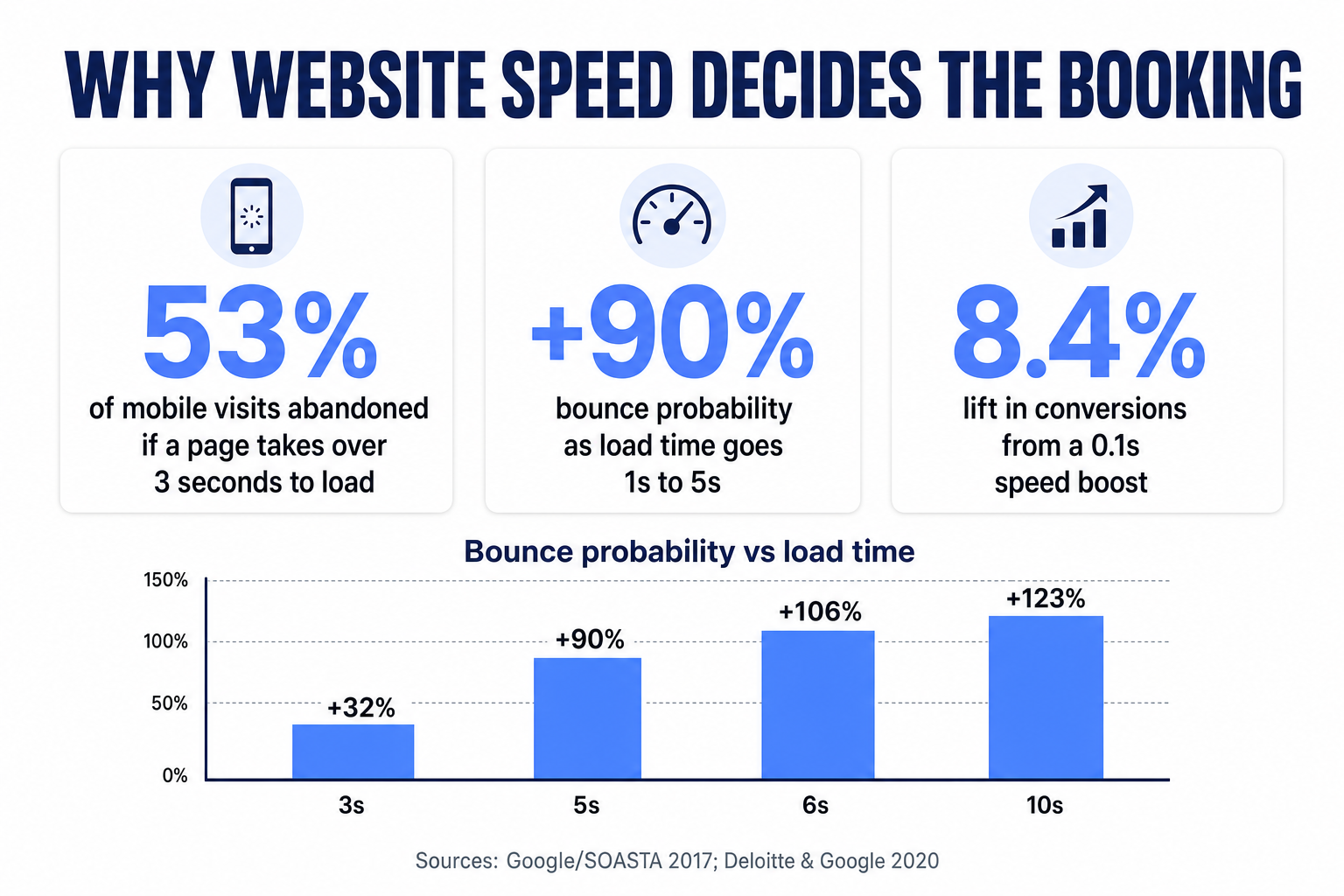
It gets steeper from there. Google’s analysis of mobile page loads found that the probability of a bounce climbs sharply as pages get slower — up 32% from a 1s to a 3s load, 90% from 1s to 5s, and 123% from 1s to 10s (Google/SOASTA, 2017).
Increase in mobile bounce probability vs. a 1-second load. Source: Google/SOASTA, 2017.
The visitors who don’t bounce still convert at very different rates depending on speed. Portent’s analysis of more than 100 million page views found website conversion rates drop by an average of about 4.42% for every additional second of load time in the first five seconds — an e-commerce page loading in one second converted at roughly 3.05%, versus about 1.08% at five seconds (Portent, 2019/2022).
Conversion rate (%) by page load time. Source: Portent, 2019/2022.
For a practice, the money follows the milliseconds. In the largest study of its kind, Deloitte and Google found that a mere 0.1-second improvement in mobile site speed increased retail conversions by 8.4% and average order value by 9.2%, with travel conversions up 10.1% (Deloitte & Google, 2020). When a single new coaching package or functional-medicine intake in Dallas can be worth well over a thousand dollars across the relationship — in a U.S. wellness economy that reached roughly $2.1 trillion in 2024 (Global Wellness Institute, 2024) — a few saved seconds is not a technical nicety. It’s booked revenue.
Core Web Vitals: the SEO scorecard Google actually uses
Speed isn’t only about the visitors you already have — it’s about whether Google shows you to new ones. Google measures real-world page experience through Core Web Vitals, and the “good” thresholds are specific: Largest Contentful Paint (LCP) of 2.5 seconds or less, Interaction to Next Paint (INP) of 200 milliseconds or less, and Cumulative Layout Shift (CLS) of 0.1 or less, measured at the 75th percentile of page loads (web.dev).
These aren’t a private developer metric. Google has confirmed that Core Web Vitals are used by its ranking systems as part of page experience (Google Search Central, 2023). They’re not a magic single ranking factor — great content still matters most — but when two Dallas wellness practices publish comparably useful pages, the faster, more stable one has an edge in the “hormone doctor Dallas” or “gut health specialist near me” results that actually drive bookings. Speed also feeds local SEO indirectly: the faster your pages, the more of your site Google crawls efficiently, and the better your local search footprint performs.
Here’s the uncomfortable part for WordPress operators: as of the 2024 HTTP Archive Web Almanac, only about 40% of WordPress origins passed Core Web Vitals — near the bottom of major CMS platforms, dragged down mostly by slow LCP (Web Almanac, 2024). Static-first architectures, by contrast, clear those thresholds far more easily because the expensive rendering work is already done before a visitor ever arrives.
Where WordPress slows down — and why it isn’t your fault
WordPress isn’t “bad” — it’s doing a lot of work on every request, and that work has a speed cost that compounds as a real practice site grows. If your Dallas site feels sluggish, it’s usually not one thing; it’s the stack:
- Per-request rendering. Every page view triggers PHP execution and one or more database queries before any HTML is sent. Caching plugins help, but they’re a patch over an architecture that assembles pages on demand.
- Plugin bloat. The booking plugin, the form plugin, the pop-up plugin, the SEO plugin, the security plugin, the page builder — each adds CSS and JavaScript that the browser must download and run. It’s the single most common cause of a wellness site failing INP.
- Page builders. Elementor, Divi, and similar tools generate heavy, nested markup that’s convenient to edit but slow to render and hard for Google to parse cleanly.
- Hosting variability. Shared WordPress hosting can mean slow server response times (TTFB), which pushes LCP past the 2.5s threshold before your content even starts to paint.
- The maintenance treadmill. Plugins and themes need constant updates, and each one is a potential security hole or a new performance regression.
None of this is a knock on the practitioners running these sites. WordPress powers roughly 43% of all websites on the internet (W3Techs) precisely because it’s approachable — but that approachability is built on an architecture that trades speed for on-demand flexibility.
How Astro is different
Astro flips the model: it does the heavy lifting once, at build time, and ships the finished result. When we build a wellness site on Astro, your pages are pre-rendered into static HTML and served from Cloudflare’s global edge. A Dallas visitor gets a file from a nearby data center that’s already assembled — no PHP, no database query, no plugin stack firing on their request.
Astro’s defining feature is that it ships almost no JavaScript by default. Interactive pieces — a booking widget, an AI chat bubble, a calculator — are loaded as isolated “islands” only where they’re actually needed, instead of loading a framework across the entire site. Less JavaScript to download and execute is exactly what keeps INP low and LCP fast, which is why a properly built Astro site routinely lands a 90+ (often 100) Google PageSpeed score on both mobile and desktop — the benchmark we guarantee on every Get a Website build.
Crucially, “static” doesn’t mean “can’t update.” You still get a real content system, forms that push leads into your CRM, an AI chat widget, and location pages — the speed comes from how the pages are delivered, not from stripping out what a modern practice needs.
The full comparison
Here is the head-to-head that matters for a wellness marketing site — not a general-purpose blog, not an e-commerce megastore, but the kind of site a Dallas practice actually runs:
| What matters for your site | Astro (Get a Website) | Typical WordPress |
|---|---|---|
| Rendering model | ✅ Pre-built HTML, served from the edge | ❌ Assembled per request via PHP + DB |
| JavaScript shipped | ✅ Near-zero by default (islands only) | ❌ Grows with every plugin & builder |
| Typical Core Web Vitals result | ✅ Passes easily; 90–100 PageSpeed | ⚠️ ~40% of WP origins pass (Web Almanac) |
| Location pages for local SEO | ✅ Individually optimized per city | ⚠️ Possible, but often bloats the site |
Schema / AEO / llms.txt |
✅ Shipped and structured by default | ⚠️ Plugin-dependent, often incomplete |
| Security surface | ✅ No plugin/DB attack surface | ❌ Plugins & core need constant patching |
| Editing & changes | ✅ Managed — you file a request, we ship it | ✅ Self-edit (but you own the upkeep) |
| Hosting / SSL / maintenance cost | ✅ Flat $97/mo, all-in | ❌ Hosting + SSL + plugin renewals stack up |
| Ongoing performance drift | ✅ Stays fast — nothing to bloat it | ❌ Slows as plugins & content accumulate |
The pattern is consistent: WordPress’s per-request, plugin-driven model is what makes it flexible and what makes it slow, while Astro’s build-once, serve-from-edge model is what makes it fast and low-maintenance. For a site whose job is to load instantly, rank locally, and book consults, that trade lands firmly on Astro’s side.
A Dallas wellness site, before and after
WordPress on shared hosting: a slider, six plugins, and a page builder push mobile load past 4 seconds. Half of phone visitors bounce before the fold paints, the site fails Core Web Vitals, and every edit means a plugin update or a $150 agency invoice.
Astro on the edge: pre-rendered pages hit 90+ PageSpeed on mobile, Core Web Vitals pass, Dallas location pages rank, and changes ship through a managed support ticket — no plugins to break, no surprise hosting bills.
What this means for a Dallas wellness practice
Dallas–Fort Worth is a large, competitive wellness market, which means your website is competing on speed whether you chose to or not. Prospective clients searching for a nutrition coach, hormone specialist, or integrative clinic in Dallas are comparing you against practices one tap away — and the fastest, most credible-looking result gets the click and the booking. A site that loads instantly and looks calm and modern quietly signals that your care is current; a slow, dated one signals the opposite before a word is read.
The practical playbook for a Dallas practice is straightforward: get on an architecture that passes Core Web Vitals by default, publish real per-neighborhood location pages so you show up for “near me” searches across the metro, and ship clean schema so both Google and AI answer engines can understand and cite your practice. That’s exactly what the Get a Website service is built to deliver — an Astro site with a guaranteed 90+ PageSpeed, up to 60 pages, Dallas location pages, and managed hosting, so the front door to your practice is fast every time someone knocks. If speed-to-lead on the booking side is your bigger leak, pair it with the speed-to-lead playbook; if retention is, start with the retention benchmarks.
Honest caveats: who should not switch
Astro is the right call for most wellness marketing sites, but not every situation — and pretending otherwise would be the kind of hype this brand avoids. A few honest cases where the answer is “it depends”:
- You publish and self-edit constantly, all day, and value doing it yourself. If daily hands-on editing in a familiar WordPress dashboard matters more to you than speed and maintenance, a well-optimized WordPress setup (good host, minimal plugins, no heavy page builder) can be acceptable. Our model is managed — you file a change request and we ship it, usually within a day or two — which most practitioners prefer, but it’s a genuine difference to weigh.
- You depend on a specific WordPress plugin ecosystem. A membership platform or a complex e-commerce catalog deeply wired into WooCommerce may be more work to move than it’s worth today. In those cases, custom development or a custom-software approach can bridge the gap rather than a lift-and-shift.
- A brand-new practice with zero traffic. If you’re pre-launch, the priority is getting any credible site up. Astro still wins on speed and cost, but don’t let “perfect” delay “live.”
For the large majority — a Dallas wellness practice that wants a fast, modern, findable site without a maintenance treadmill — the speed, SEO, and cost math points to Astro. And if you’d rather not manage any of it, a dedicated wellness VA can run the site and the automations around it for you.
Frequently asked questions
Astro vs WordPress for wellness websites — FAQ
Is Astro really faster than WordPress for a wellness website?
For a typical marketing site, yes — and the reason is architectural. Astro pre-renders your pages into static HTML and serves them from a global edge network with almost no JavaScript, while WordPress assembles each page on the fly through PHP, a database, and plugins on every request. That's why well-built Astro sites routinely score 90–100 on Google PageSpeed, while only about 40% of WordPress origins passed Core Web Vitals in 2024 (HTTP Archive Web Almanac).
Why does page speed matter so much for a Dallas practice?
Most 'near me' wellness searches happen on a phone, and about 53% of mobile visits are abandoned if a page takes over 3 seconds to load (Google). Bounce probability rises 90% as load time goes from 1 to 5 seconds, and conversions fall roughly 4.42% for every extra second (Portent). In a competitive market like Dallas–Fort Worth, the faster site gets the click and the booking.
Will switching to Astro help me rank higher on Google?
It helps, but it isn't magic. Core Web Vitals are used by Google's ranking systems, so a faster, more stable site has an edge when content quality is comparable — and speed lets Google crawl more of your site efficiently. Great content and proper local SEO still do the heavy lifting; Astro removes the speed penalty that holds many WordPress sites back.
Can I still update an Astro site, or is it locked?
You can update it — 'static' refers to how pages are delivered, not to being frozen. With the Get a Website service, changes go through a managed support ticket (up to 10 per month) and most are done within a day or two. You get forms that push leads to your CRM, an AI chat widget, and location pages; you just don't carry the plugin-maintenance burden yourself.
What does an Astro wellness website cost compared to WordPress?
The Get a Website service is $497 one-time plus $97/month, and you only pay the build fee after the site is live and you're happy. The $97/month covers managed Cloudflare hosting, your domain, SSL, and maintenance — no separate hosting, SSL, or plugin-renewal bills. WordPress's 'cheap' entry cost often grows once you add hosting, premium plugins, and agency edit fees.
Written by Anjali Mehta, Wellness Growth Editor. Anjali covers the business of wellness — pricing, marketing, and the operational decisions that decide whether a great practitioner stays small or scales. She has a low tolerance for hype and a preference for honest math. Anjali writes about wellness-practice growth and marketing technology; she is not a licensed healthcare provider, and nothing here is medical advice.
Keep reading: Local SEO for Wellness Practitioners · Speed to Lead: Why the First 5 Minutes Decide the Client · Wellness Client Retention Benchmarks · Get Wellness Clients From Instagram